Rocket.net and WP Engine provide fully managed WordPress hosting, though their services are priced higher than standard shared or VPS plans.
So why fully manage WordPress hosting?
Shared hosting is often slow, as it requires sharing server resources with many other websites. And servers may experience slowdowns, crashes, or restarts due to various issues, especially during peak traffic.
But fully managed hosting is a good option for anyone who does not want to set up or maintain a VPS or dedicated web server. There are many such hosting providers, including Kinsta, Rocket.net, WP Engine, BigScoots, SiteGround, and many more.
WP Engine is more established than Rocket.net, but Rocket offers additional features, including Redis PRO, higher monthly visits, and full Cloudflare Enterprise integration.
Regular web publishers use WP Engine, but Rocket is specifically designed for modern users. WPE uses regular SSDs despite running on Google Cloud. NVMe drives offer faster read and write speeds than traditional SATA SSDs.
I prefer using a VPS with a cloud hosting control panel over fully managed WordPress hosting. And hosting performance directly impacts site speed and traffic capacity.
I wouldn’t recommend WPEngine or Rocket.net to newbies or small sites. Also, they’re unsuitable for users with high bandwidth or storage requirements.
It may be more practical to compare WP Engine and Rocket using charts, as their differences are clearly visible.
TL;DR Rocket.net vs WP Engine
I outline the pros and cons of both hosting options. For a quick overview, the key points are summarized in the following table:
| Entry-level Plan | Rocket.net | WP Engine |
|---|---|---|
| Price Start | $30 | $24 |
| Monthly Visits | Unlimited | 25,000 |
| Bandwidth | 50GB | 75GB |
| Magic Login | ✓ | x |
| PHP Memory | 1GB | 512MB |
| Refund | 30 Days | 60 Days |
| Storage Type | NVMe | SSD |
| Object Cache | Redis Pro | Memcached |
| x | x | |
| Free Migration | Unlimited | Plugin |
| Cloud Platform | Private Cloud | Google Cloud C2 |
| PHP Workers | Unlimited | Starting with 2 |
| Data Centers | 07 | 30+ |
| DNS Provider | Cloudflare | Private |
| CDN | Cloudflare Enterprise | Cloudflare |
| Virus scans | Real-time | Insufficient |
| Full-Page Caching | ✓ | x |
| Support | Excellent | Good |
| File Manager | ✓ | x |
| Restricted Plugins | No | Yes |
| Image Optimization | ✓ | ✓ |
| PHP Handler | LiteSpeed | FastCGI |
Rocket.net

Things have changed: Rocket hosting has been acquired by World Hosting Group, a company similar to Newfold Digital, which is now rapidly acquiring other web hosts. Old features, pricing, and performance are still available, but may change at any time. There’s lots of stuff negative about WHG, so rocket.net isn’t recommended anymore.
I used to choose Rocket.net over other managed WordPress hosts I tried because it felt modern and stayed up to date. It has gained attention for its robust Cloudflare integration and edge caching.
All plans include unlimited PHP workers, ideal for large and medium-sized sites that handle high volumes of dynamic requests. Similar providers, such as WP Engine and Kinsta, typically limit the number of PHP workers.
Rocke.net hosting provided fast website performance and an ideal user experience. They accomplish this by utilizing full-page caching with other optimizations.
Rocket Web Hosting offers a magic login feature that lets users access WordPress websites without a password.

That said, I don’t optimize websites solely for page speed metrics because a site’s naked-eye speed should be the speed that matters, without including elements that are swiped into page speed test tools.
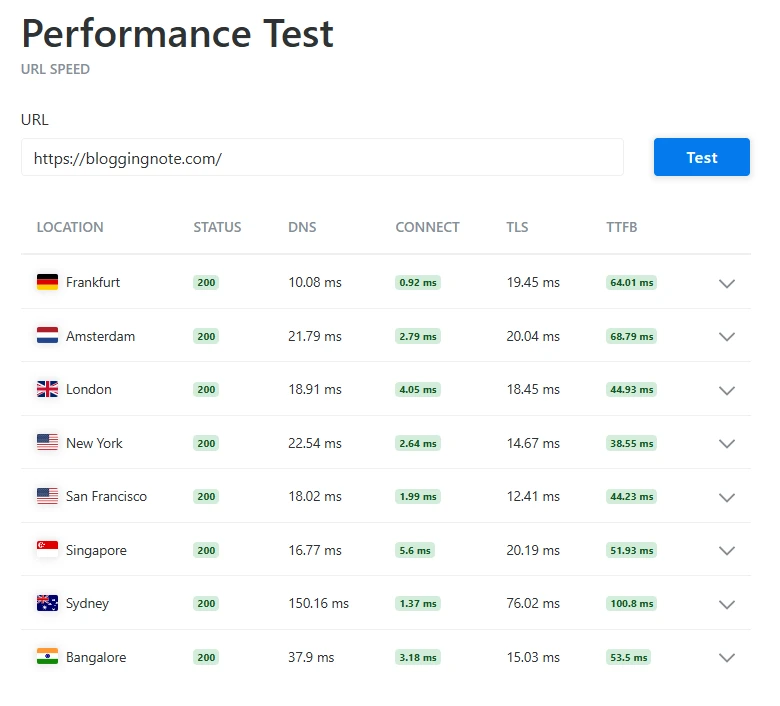
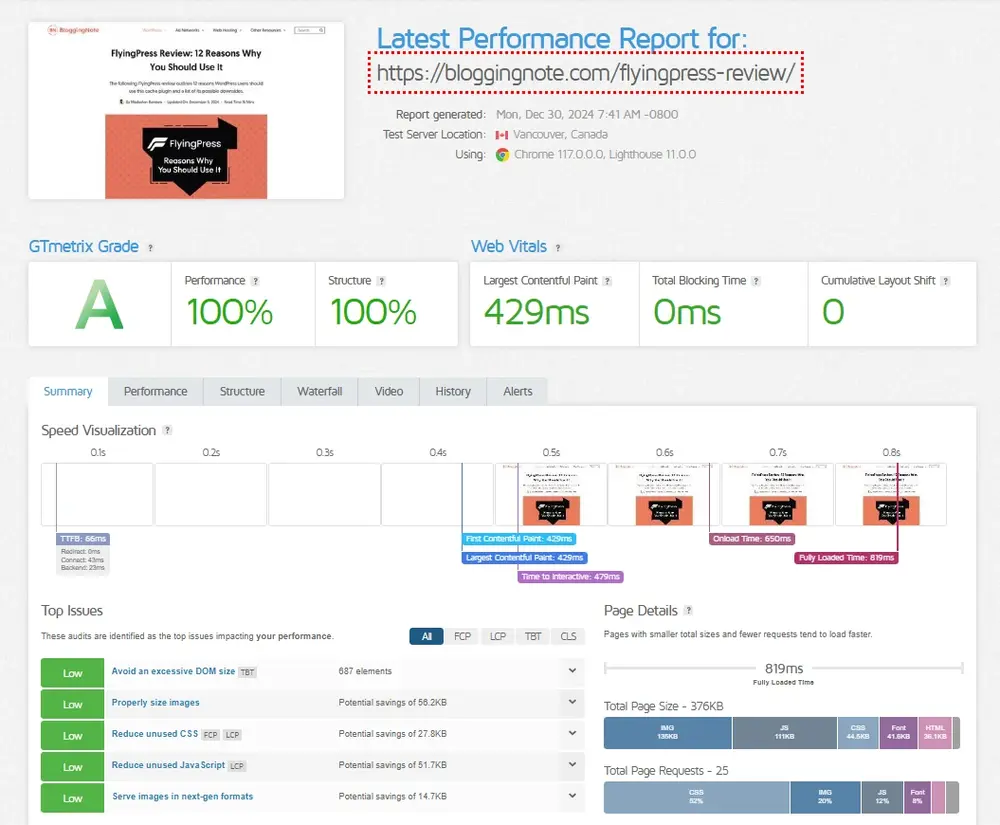
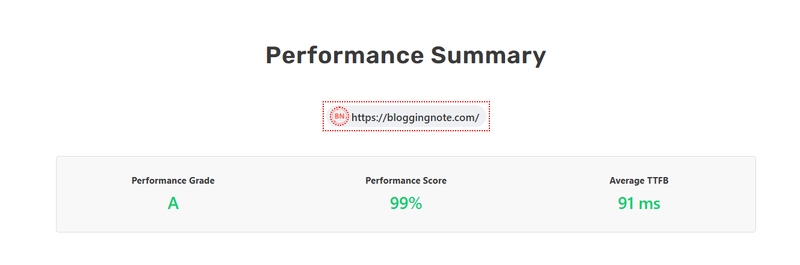
But here are some screenshots of the page speed metrics using Rocket with the FlyingPress cache plugin optimization:
The good thing is that there aren’t any restrictions on WP plugins, so you can even use security and cache plugins.

I am not a fan of WP Rocket because FlyingPress is a better overall option. However, Rocket-Net allows you to use the WP Rocket plugin for free.
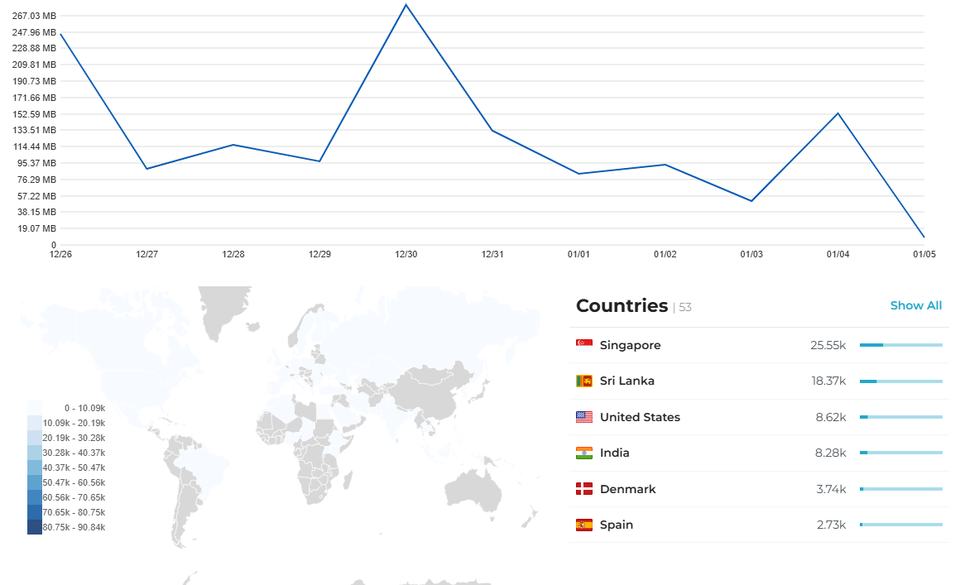
Rocket-Net includes a helpful reporting section that lets you view metrics such as bandwidth usage, visitor count, IP addresses, and device information. I appreciate how it displays data such as top referrers, cache status, and WAF history.
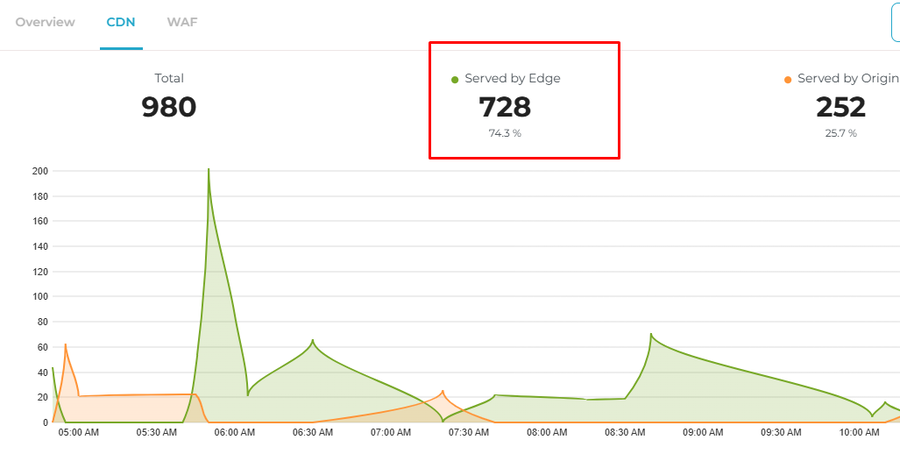
View the cache hit ratio and the number of requests handled by the Edge or Origin servers in the CDN section. Your WordPress site needs a reliable web host.
How Does Rocket.net Pricing Work?
Rocket.Net is expensive for beginners, but it is simple to use and works smoothly. The cost starts at $30/month for 1 site and increases to $200/month for 20 sites.
If you pay annually, you’ll get two months free. It can be affordable for a few sites, but it becomes pricey for several small ones.
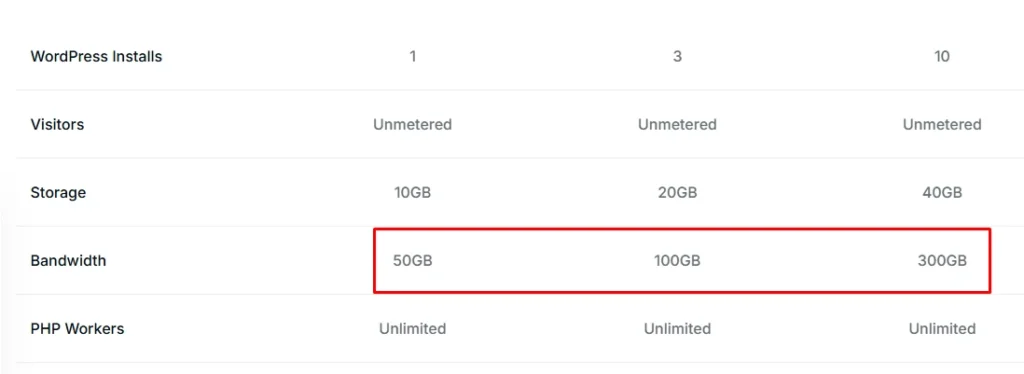
It depends on your bandwidth and storage needs; the more you use, the more you’ll pay. Even the starter plan offers more than 250K monthly visits, making it stand out from others. The first month costs $1, excluding enterprise.

Rocket offers hosting for sites of all sizes. They offer Level 1 packages for small sites, with enterprise hosting starting at approximately $2,000 per month.
Cloudflare Enterprise Features
RocketNet is notable for its full integration with Cloudflare Enterprise, and it has become a trend for most other hosts to implement the same solution. They don’t limit staging sites like WPE does. I’ve used Cloudflare Enterprise directly, and most features are unnecessary.
The enterprise plan includes 2,700 Cloudflare rules, and Rocket integrates seamlessly with custom rules. Instead of Cloudflare APO, they use caching rules to cache full pages and bypass some elements. That is why most other hosting providers lack full integration with CF Enterprise. They don’t know how to integrate accurately.

This is good because most of your website traffic passes through Cloudflare CDN servers rather than the hosting server.
Using Rocket, you don’t need WordPress security, cache, image optimization, or any other plugin. And it’s not just for CDN or security reasons; you’ll get helpful enterprise features, such as:
- Argo Smart Routing: Argo can significantly reduce latency and improve speed when handling requests through Cloudflare’s network (using the fastest routes).
- Image Optimization: Rocket optimizes images and removes unnecessary attributes without compromising quality, utilizing Cloudflare’s Polish and Mirage image optimization. You do not need to use image optimization plugins.
- Enhanced Protection: Enterprise plans include additional security measures. Your website is secure across the host and CDN without requiring plugins.
- Load Balancing and Prioritized Routing: Cloudflare’s load balancing is a subscription-based feature that supports multiple traffic distribution methods. The result is lower latency and faster routines on each server. Prioritized routing helps reduce traffic overload, peaks, and outages.
- Various caching options: Rocket offers additional caching features, including tiered and full-page caching. Also includes multiple server-side caching layers.
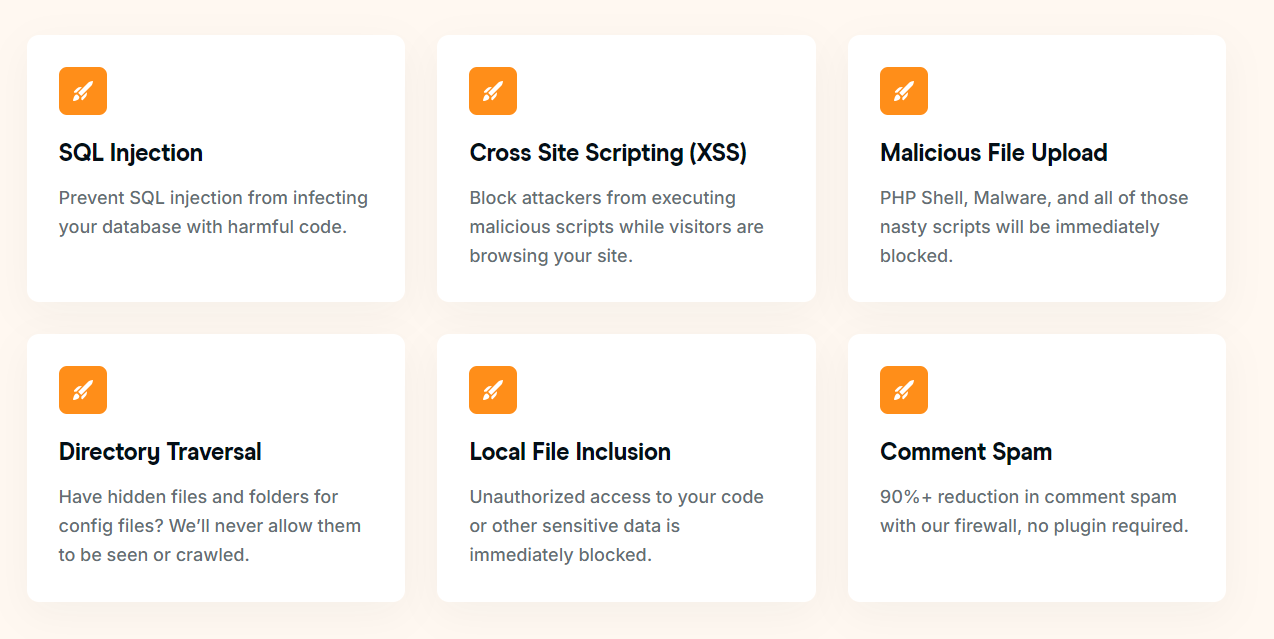
Rocket.net utilizes Cloudflare Enterprise to extend security features, including protection against SQL injection, XSS, file uploads, directory traversal, unauthorized access, and spam (FlyingCDN, for example, uses Cloudflare Enterprise).
They provide protection against the most common threats to your WordPress site. The server features an Imunify firewall that detects malware in real-time. You can view your website’s security status and find detailed information about incidents.
Pros:
- No limits on PHP workers.
- All plans include unlimited monthly visits.
- Modern hosting infrastructure and enterprise CDN.
- Enhanced security with Cloudflare Enterprise’s firewall.
- Full-page caching with Global TTFB under 100 milliseconds.
Cons:
- Owned by World Hosting Group.
- It can get expensive if you need a lot of bandwidth.
- Users need to manually clear the cache after making changes.
WP Engine

WP Engine is a mature, managed WordPress hosting company. It is a big name, but it’s slow, especially for heavy websites. Marketing makes it pricey—instead of focusing on quality, they focus on marketing.
WPEngine has a list of disallowed plugins; most are banned because they’re large or have vulnerabilities, but Rocket hasn’t banned any plugins or themes.

Catch how much it costs to host one site on WP Engine with 100K visits a month, almost $100 for month. For that price, I can host multiple websites with unlimited visitors on a cloud VPS like Vultr. I think WP Engine is overpriced, and its pricing is driven more by its brand and marketing tactics than by the quality of its service.
However, many other reputable providers still offer more competitive rates. Web hosts rely on promotional marketing, but WPE’s approach is particularly aggressive. Also, scheduled maintenance is excluded from their uptime guarantees.

There is usually a safe and reliable configuration on managed hosts. Most blog publishers recommend them because they offer high affiliate commissions.
Compared to VPS, WPEngine is like a shared host—it’s popular with novices but hated by techies. But it’s a long-running managed hosting service.
Pros:
- Offers more bandwidth than Rocket.
- It uses Google Cloud infrastructure (SSD).
- Good customer service and tech support.
- An established WP-managed hosting service.
Cons:
- Strict limits on server resources.
- Instead of focusing on quality, they prioritize branding.
- Old stacks, such as SSD, Memcached, and Apache.
Managed WordPress hosting is typically a form of shared hosting. It often utilizes servers from Google or AWS, which is why they limit your disk space, bandwidth, and other resources. Despite the limits, these hosts outperform typical shared hosts.
VPSs offer more flexibility because the resources are reserved exclusively for your site. You can approach things a little differently and make adjustments as needed.
For this reason, I recommend hosting most of your websites on a VPS. You can run your development websites on cheap VPSs like Starlight and Webdock.
To Sum It Up
I still think Rocket.net has better features than WP Engine. Both use Cloudflare, but Rocket uses Cloudflare Enterprise, which offers additional features such as smart routing and full-page caching.
While WP Engine uses Memcached, Rocket uses Redis PRO as its object cache. Rocket uses LiteSpeed as the PHP handler, while most others use FastCGI.
In my view, neither hosting option is suitable. When looking for a good web host, you’ll find many sites that say some options are bad and not worth your money.
However, there are numerous satisfied customers. Others have very positive reviews and suggestions, but they’re not helpful. Many people choose low-cost hosting with discounts, but you can rely on trusted hosting providers for a better experience.
Let’s end this WP Engine vs Rocket.net comparison. Upgrading from shared hosting to a more advanced web host can improve your website’s loading speed.
Read More: Copy Text From Protected Websites | Raptive Alternatives