Spaceship, a sub brand of Namecheap, is primarily recognized as a domain registrar. But they offer affordable hosting than Namecheap. Starlight Virtual Machines offers cheap, unmanaged VPSs with some good features. Simply put, I have had both good and bad experiences with Spaceship (Starlight) hosting, so here is my review.
Key Features:
Spaceship VPS runs on AMD EPYC 7742 CPUs, DDR4 3200 RAM, and NVMe SSDs and has a 1 Gbps network speed.
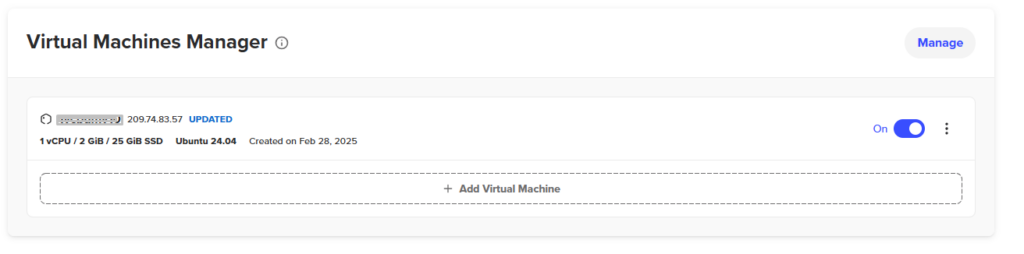
- Server config: Launchpad allows you to perform basic server management tasks, such as turning off/on, rebooting, destroying, and reinstalling.
- Security: Several security features (the ability to change the SSH port).
- Supported OS: CentOS, Fedora, Ubuntu, AlmaLinux.
- Server analysis: Real-time insight into servers’ performance and health.
- Customization: Starlight VPS offers limited customization options. And there is no control panel; instead, there is only a launchpad.
Managed VPSs differ from self-managed ones. Personally, I prefer unmanaged VPS hosting and like to experiment with it. Managed VPS provides everything you need without requiring server configuration, but it costs more.
It can also slow down servers due to the preconfigured apps and the control panel. But I like unmanaged VPS, and I can handle myself. Spaceship VPS is unmanaged, but its performance isn’t as impressive as that of DigitalOcean, Katapult, Vultr, etc.
I purchased a standard 1 VPS, which costs less than $5 a month. It is suitable for static websites and includes 1 core, 2 GB RAM, 25 GB NVMe storage, and 1 TB bandwidth.
It’s decent, but not exceptional when compared to others. And you can obtain a 4 GB RAM/2-core package for under $12/Mo.
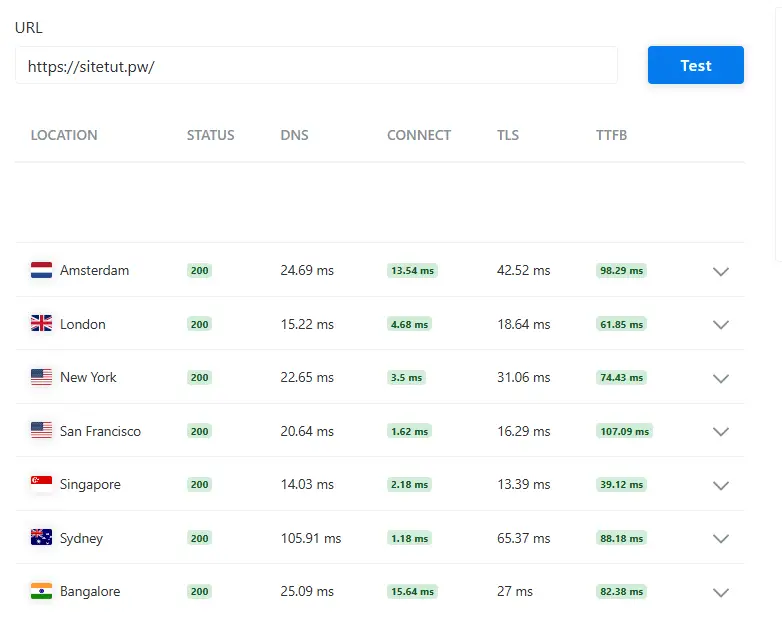
With Ubuntu, I’ve installed WordPress with the default software pack, which includes OpenLiteSpeed and MariaDB. An SSL certificate is pre-installed. Here is a sample TTFB test without any optimization.
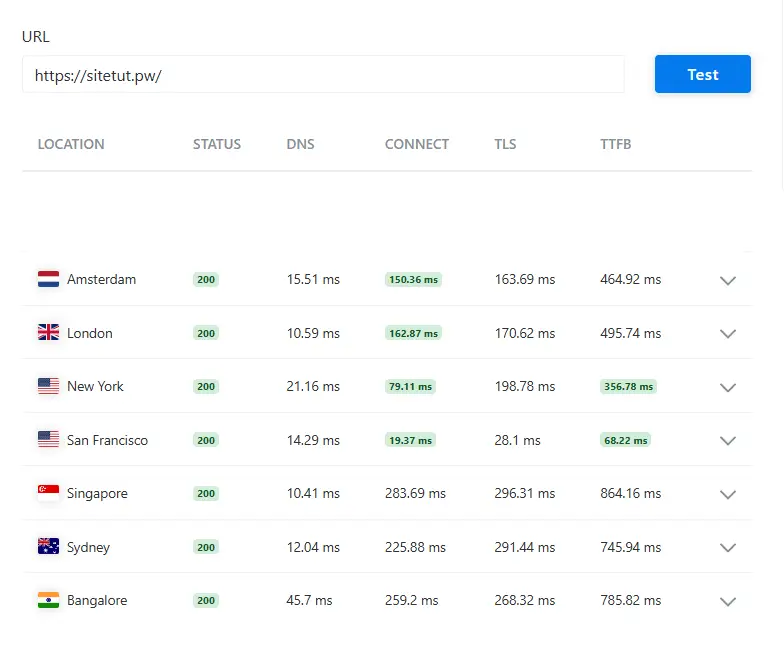
Performance isn’t ideal; it’s only acceptable in the US, as Arizona has only one data center. You need to employ some speed tactics to resolve this issue.
Cloudflare APO is a paid add-on designed to optimize WordPress performance, especially first-byte speed. So here is a sample TTFB test using APO.
To make things even better, you can use a powerful cache plugin like FlyingPress. There are many ways to optimize WordPress websites, but I’m not here to explain them all. But web hosting speeds matter, especially for dynamic sites.
What Makes Spaceship VPS Better?
First, Starlight Hosting offers a very competitive price; it’s cheaper than most competitors. Yes, there are more affordable alternatives, such as WebDock.
With this VPS, software installation is easier when deploying or reinstalling virtual machines. You can choose apps based on OS and VM specs.
Selected apps will be automatically installed whenever you deploy. Using MariaDB with Ubuntu, you can install OpenLiteSpeed and WordPress with a single click. Using this method, you can easily install or reinstall WordPress in Launchpad.
The downside is you can’t customize much. Of course, if you just want a simple website without optimizations, that’s fine. However, for serious websites, it is always better to use a VPS with cloud control panels such as xCloud, RunCloud, etc.
Spaceship VPS Plans and Prices
Their pricing approach is beneficial because you don’t have to pay up front. Since plans have monthly billing periods with post-billing, you’ll pay hourly for the previous month. Also, ensure you terminate your VPS rather than shutting it off.
In other words, you’ll only pay for how much you use it. When you terminate your VPS, you will not incur any additional billing. You can try VPS for just a few cents.
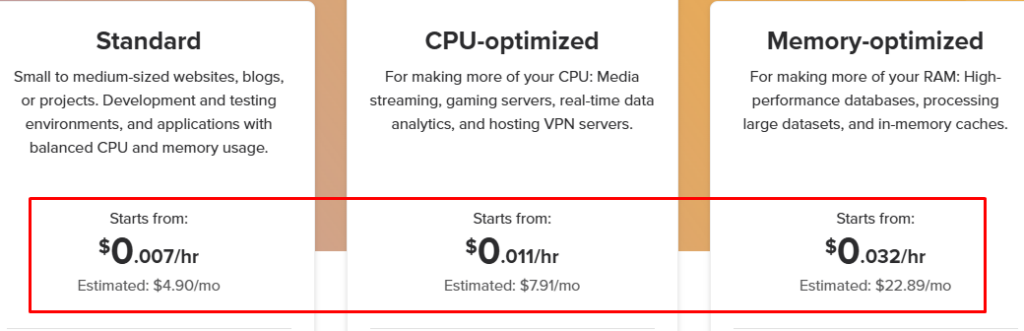
There are three types of hosting configurations:
1. Standard:
This is the cheapest option and is suitable for small- to medium-sized websites. It is ideal for development and testing scenarios, as well as for applications that require moderate CPU and memory resources.
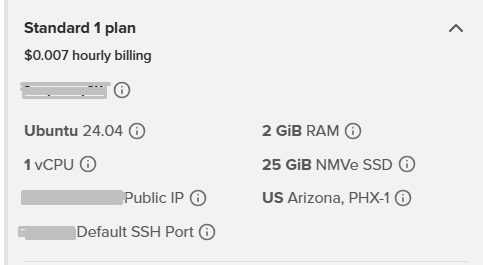
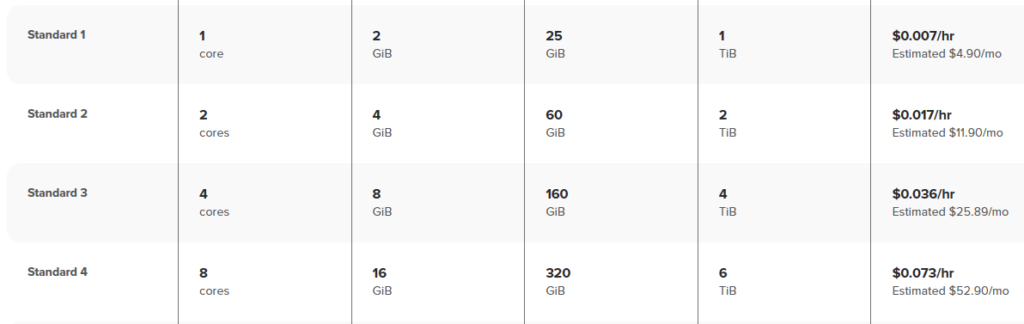
With the Standard 1 plan, you get 1 AMD core, 2 GB of RAM, 25 GB of NVMe storage, and 1 TB of bandwidth for less than $5 per month. Statistically, you can get up to 8 cores and 16 GB RAM for $50 a month.
2. CPU-Optimized:
You’ll pay a little extra for these virtual machines, but they’re ideal for websites with high CPU usage and also work for VPN servers. With more cores, you get faster processing; a dedicated CPU means the cores aren’t shared.
CPU-intensive sites are those that require heavy processing or contain uncacheable dynamic content. Particularly useful if you use fancy WordPress themes or want to host documentation sites.
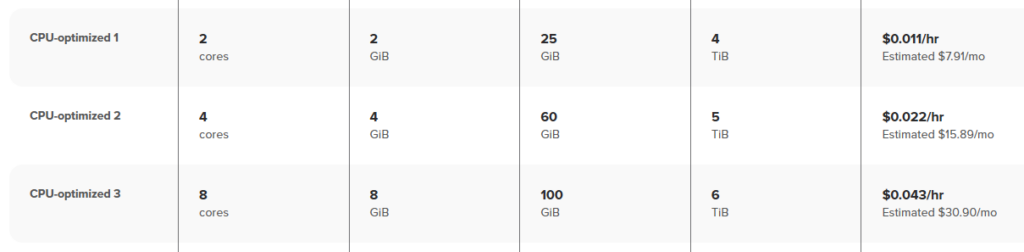
The CPU-optimized 1 plan starts at nearly $8 and includes 2 cores, 2 GB of RAM, 25 GB of storage, and 4 TB of transfer. You can get up to 8 cores.
3. Memory-Optimized:
It’s ideal if you need more RAM to handle large databases and memory-intensive tasks. If you have static sites, these aren’t necessary; however, they can be helpful when a large amount of RAM is being used.

These are suitable for caching heavy objects in memory or expiring files. Expensive options—however, you can get up to 16 GB RAM VPS for 45 USD.
Downsides to Starlight Spaceship VPS?
Starlight VPS from Spaceship is a developing product, so expect some features that may not be available yet. Actually, they require some work in these areas…
- One Data Center: They have a single data center located in Phoenix, USA, which allows you to host a site in the US or utilize it as a VPN. But for others, this is a big downside, so I hope they’ll add more data centers. Use a CDN, such as Cloudflare’s paid plans or FlyingCDN, to reduce global latency.
- No Control Panel: Starlight Hosting lacks a proper control panel. They only offer “Starlight Manager,” which provides basic server management tools. However, this is a weak point compared to other cloud hosts.
- Little Slow: I have used various VPSs, from large to small, over the years. So, Starlight VPSs aren’t that fast. TTFB’s performance isn’t as good as competitors’, but it’s enough for most static content sites.
- Hard to Use SSH Terminal: They shouldn’t have created that kind of SSH terminal. It’s useless, so you’ll need an external SSH client, such as Putty.
- Non-Customizable: They don’t have an actual control panel. You can install WordPress, but you can’t customize it server-side.
There may be more cons, and don’t expect performance comparable to Linode, DigitalOcean, Vultr, or Katapult. I still wouldn’t recommend this for serious sites.
My Final Thoughts On Starlight VPS Hosting
OK, friends. Starlight Virtual Machines (Spaceship VPS) is a suitable hosting option for static websites and US VPN servers. These are powered by AMD EPYC and NVMe SSDs and deliver 1 Gbps network speed. However, there are three key issues: the lack of a control panel, a single data center, and a poor SSH terminal.
For testing purposes, I used their entry-level hosting plans. The performance wasn’t very impressive, but I don’t think it will be a significant issue for most people.
You can install OpenLiteSpeed with WordPress during virtual machine deployment. It includes a free SSL certificate, but you can’t customize it.
I like their pay-per-use pricing model—instead of paying upfront, you pay after you’ve used the service. And I’m not sure how their support works, because unless there’s a server-side issue, I don’t require web hosting support.
Spaceship VPS is suitable if you want to try hosting a website in the US or use US VPN servers. I mean, there are definitely better VPS options available.
Read More: Copy Text From Protected Websites | WP Engine vs Rocket.net